

As an Amazon Associate we earn from qualifying purchases. We research products independently, and commissions never change our picks.
The best monitor arm lifts your screen off the desk and lets you set height and angle exactly where you need them. Screen size, weight limit and desk compatibility decide the right pick.
We compared four monitor arms from Amazon listings, including ultrawide, single and dual designs. We have not lab-tested them, so our notes follow stated size and weight limits.
Top 4 Best Monitor Arms
VIVO Aluminum Ultrawide Monitor Tension Arm Up to 49 Inch
- Fits ultrawide monitors up to 49 in
- Holds up to 44 lbs
- Spring-assist tension arm
Desktronic Single Monitor Mount Up to 34 Inch
- Aircraft-grade aluminum build
- Up to 34 in and 8 kg
- 360 degree rotation
ErGear Single Monitor Arm for 13 to 34 Inch Screens
- Fits 13 to 34 in screens
- Fully adjustable
- Ultrawide compatible
VIVO Aluminum Ultrawide Monitor Tension Arm Up to 49 Inch
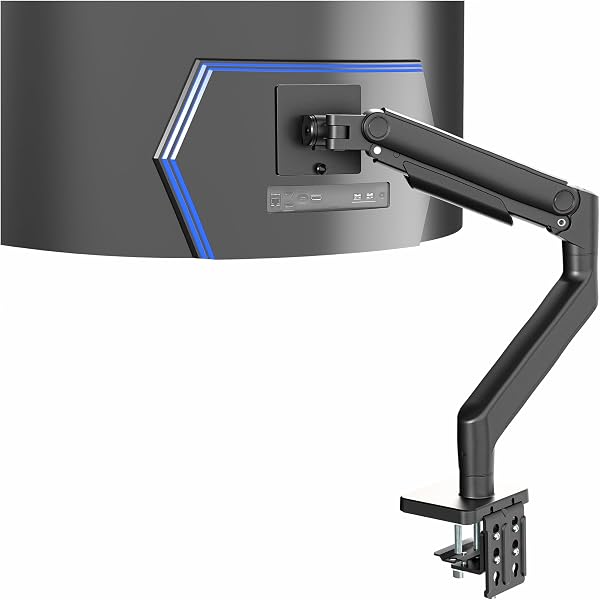
- Fits ultrawide monitors up to 49 in
- Holds up to 44 lbs
- Spring-assist tension arm
- Needs a sturdy desk
- Needs weight tuning
| Brand | VIVO |
|---|---|
| Type | Monitor arm |
| Highlights | Up to 49 in, 44 lbs, tension arm |
VIVO supports ultrawide screens up to 49 inches and 44 pounds, and its spring-assist arm counterbalances the weight for smooth height changes.
Best for: Ultrawide and heavy monitors.
Skip it if: You have a small monitor only.
Desktronic Single Monitor Mount Up to 34 Inch

- Aircraft-grade aluminum build
- Up to 34 in and 8 kg
- 360 degree rotation
- Lower weight limit
- Single monitor only
| Brand | Desktronic |
|---|---|
| Type | Monitor arm |
| Highlights | Up to 34 in, 8 kg, 360 rotation |
Desktronic is a lightweight aluminum arm with full rotation and height adjustment for monitors up to 34 inches.
Best for: Standard and curved monitors.
Skip it if: Your monitor is very heavy.
ErGear Single Monitor Arm for 13 to 34 Inch Screens

- Fits 13 to 34 in screens
- Fully adjustable
- Ultrawide compatible
- Check VESA pattern first
- Single monitor only
| Brand | ErGear |
|---|---|
| Type | Monitor arm |
| Highlights | 13 to 34 in, adjustable, heavy-duty |
ErGear covers a wide range of screen sizes and is described as heavy-duty and fully adjustable.
Best for: Mixed setups and many screen sizes.
Skip it if: You need dual arms.
HUANUO FlowLift Dual Monitor Stand Desk Mount

- Holds two monitors
- Fully adjustable
- Desk clamp mount
- Needs a desk that meets clamp conditions
- Larger setup
| Brand | HUANUO |
|---|---|
| Type | Monitor arm |
| Highlights | Dual arm, adjustable, desk mount |
HUANUO FlowLift holds two monitors on one stand and lets you adjust each one, freeing up desk space.
Best for: Two-screen workstations.
Skip it if: You use one monitor.
How to Choose a Monitor Arm
Check VESA and weight
Your monitor needs a VESA mount pattern and must stay under the arm weight limit.
Desk compatibility
Clamp mounts need a solid desk edge of the right thickness. Check the listing conditions.
Single, dual or ultrawide
Match the arm to your screens, since ultrawides need higher weight and width support.
Frequently Asked Questions
What does VESA mean?
It is the standard hole pattern on the back of a monitor, such as 75×75 or 100×100.
Will it damage my desk?
Clamps can mark soft surfaces, so use the included pads.
Final Verdict
VIVO is our ultrawide pick, Desktronic and ErGear are solid single arms and HUANUO is the dual-monitor option.
Looking for something else? Browse more home office accessories in our Home Gear guides.
As an Amazon Associate we earn from qualifying purchases.




Write Your Review
No reviews yet. Be the first to share your experience!